
Agent Skills
Overview
SpecStory mines your synced coding-agent sessions into reusable, installable Agent Skills — review them in the cloud, install them with the CLI.
Agent Skills are markdown workflows that give your AI coding agents specialized, repeatable knowledge. SpecStory Cloud mines your synced sessions, judges candidate skills cross-vendor, and surfaces the confirmed ones for you to install into Claude Code, Codex, Cursor, Antigravity, and Droid.
Info
Skills are available with the Pro or Team plan.
Where skills come from
Every skill is generated from the sessions you sync to SpecStory Cloud — your specstory run / watch / sync history is the raw material the miner works from. The more you sync, the more it has to mine. The cloud's lore pipeline:
- Mines your synced sessions in background runs.
- Judges candidate skills cross-vendor (does this hold up across Claude, Codex, Cursor, Antigravity, Droid?).
- Forges the confirmed ones into your library as
SKILL.mdfiles ready to install.
You don't author skills by hand (though you can customize them after install). They're discovered from your own history, and you can watch the mining runs that produce them on the Run Activity tab.
The skill lifecycle
Every skill exists in one of three states:
| State | Meaning | What you do |
|---|---|---|
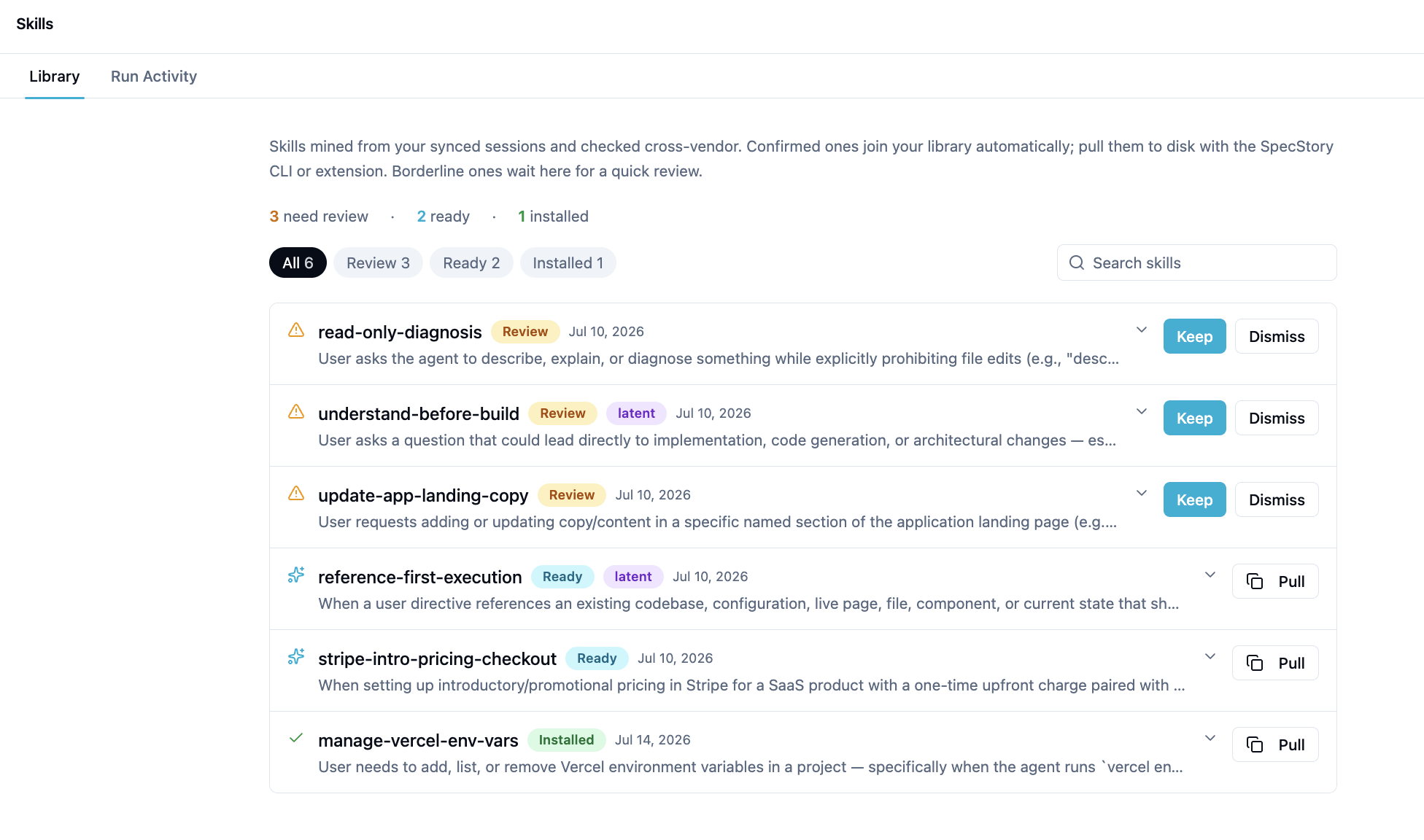
| Review | Borderline — the miner found a candidate but wants a human yes/no | Approve (Keep) or Dismiss it |
| Ready | Confirmed and in your library, but not on disk yet | Install it to your agents |
| Installed | On disk and available to your agents | Use it; reinstall or uninstall as needed |
Approved Review skills become Ready. Installed skills can be uninstalled or reinstalled at any time.
Two surfaces, one engine
You can work with skills from either of two places — they stay in sync because they talk to the same cloud API:
- The Skills page on cloud.specstory.com — browse, filter, search, approve/dismiss, view mining runs, and trigger new runs. When you click Pull on a Ready skill, the page gives you a
specstory skills pull <name>command to copy. - The SpecStory CLI —
specstory skillsopens an interactive TUI with the same library plus a live install panel (pick scope and target agents, install/reinstall/uninstall). Every action is also available as a non-interactive--jsonsubcommand for scripting and editor integration.
A skill you approve in the browser is immediately installable from the CLI. A skill you install from the CLI shows up as Installed in the browser.
Prerequisites
-
A SpecStory Cloud account on a Pro or Team plan (skills are a Pro/Team feature).
-
The SpecStory CLI installed and logged in:
brew tap specstoryai/tap && brew trust specstoryai/tap && brew install specstory specstory login -
At least one terminal agent installed (Claude Code, Codex, Cursor, Antigravity, or Droid) so installed skills have somewhere to land.
-
Sessions synced to Cloud — run
specstory run <agent>orspecstory syncso the miner has something to mine.
Note
Local resume and search always work for everyone, but Skills require a Pro or Team plan and Cloud login. The server enforces the entitlement on every skills endpoint.
Quick start
# Log in and check your plan
specstory login

# Open the interactive skills browser (TUI)
specstory skills

# Or install a specific skill you saw on the web page
specstory skills install my-skill
Or generate, browse and review on the web at cloud.specstory.com/skills.
Next Steps
- Review & trigger runs — approve borderline skills and kick off mining from the cloud page.
- Install skills — the CLI commands and what happens on disk.
- Assessing skills — theme vs. correlation skills, confidence, evidence, and outcome lift.